 OriusBotHelp center
What is the “Anti-raid & anti-nuke” page for and how do I read it?
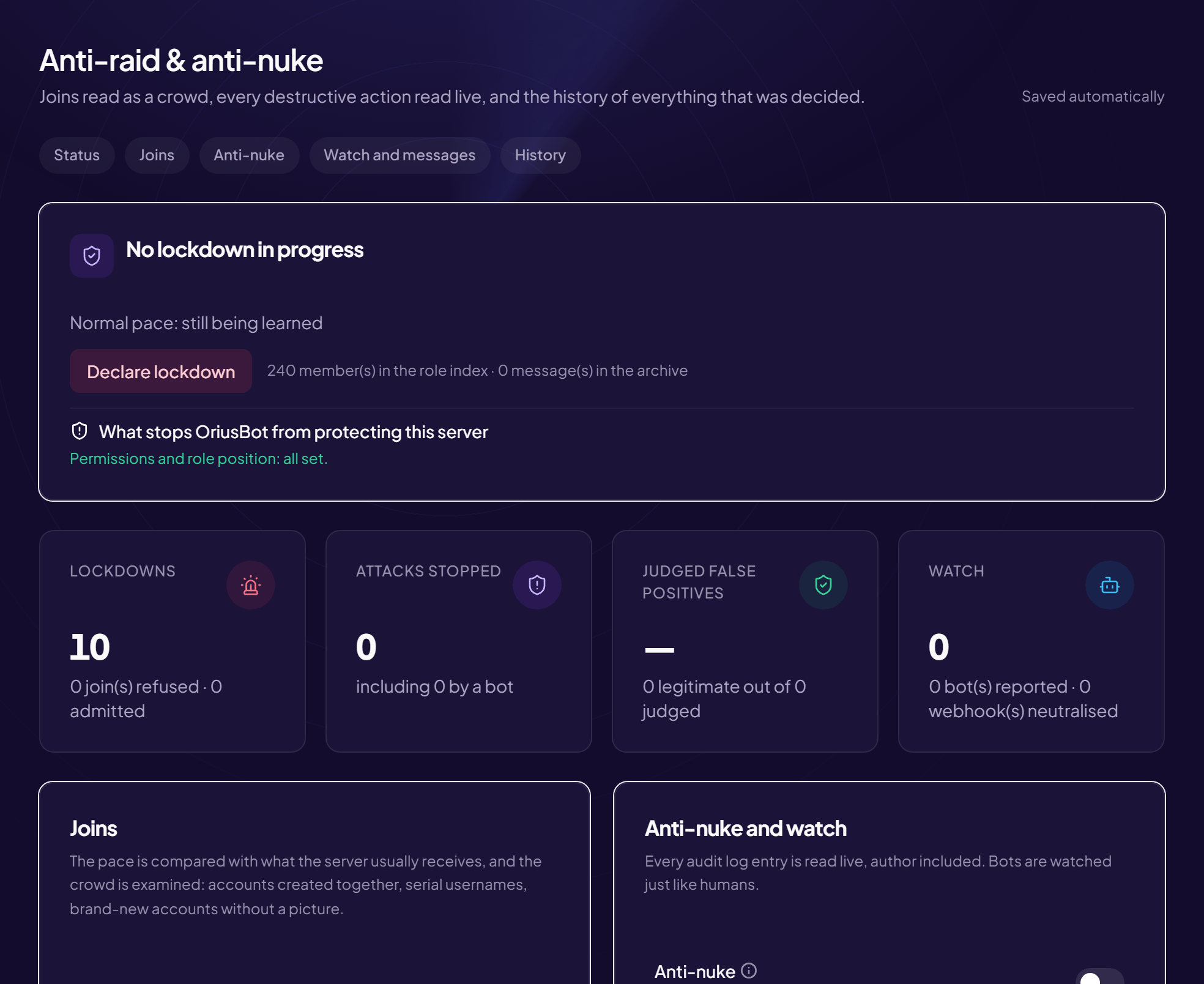
This page protects your server against two attacks:
- the raid: dozens of fake accounts arrive at once to spam or wreck the atmosphere;
- the nuke: someone (a hijacked account, a compromised bot) deletes or creates channels, roles and bans in bursts.
Displayed title: Anti-raid & anti-nuke. Protection › Anti-raid & anti-nuke menu.
The tab bar
| Tab | What you set there | Article |
|---|---|---|
| Status | Lockdown in progress or not, learned pace, permission diagnostic, statistics. | Diagnostic, Lockdown |
| Joins | Join-wave analysis, crowd analysis, measures during a lockdown. | Joins |
| Anti-nuke | Watching destructive actions, thresholds, sanctions. | Anti-nuke |
| Watch and messages | Suspicious bots and webhooks, @everyone floods, raid signature. | Watch, @everyone |
| History | Anti-nuke incidents and the log of everything decided. | History |
The master switch
- Open the page Protection › Anti-raid & anti-nuke menu.
- In the “Joins” card, find “Protection enabled” It is the main switch: without it, nothing applies on the whole page. While it is off, the other switches are greyed out and the lockdown button is inactive.
- Turn it on Saved immediately.
The status card
At the top, the card shows either “No lockdown in progress” or “Lockdown in progress since… — reason”. It also shows:
- your server’s learned normal pace (for example “~12 joins per hour”), or “still learning” at first;
- the number of members in the role index and messages in the archive;
- the diagnostic: what may stop the bot from protecting you (see the article).
Last 30 days statistics
Four tiles summarise activity: lockdowns, attacks stopped, false positives judged, watch (bots flagged and webhooks neutralised).
Where to start?
1) Turn on “Protection enabled”. 2) Look at the diagnostic and fix what is flagged. 3) Choose an alert channel. The rest can stay on default values.
Still stuck?
Contact support with the title of this article, the step where you are stuck and what you see on screen.
Contact support More articles: ProtectionLast checked: 13 November 2026.