 OriusBotHelp center
What is the “Server map” for?
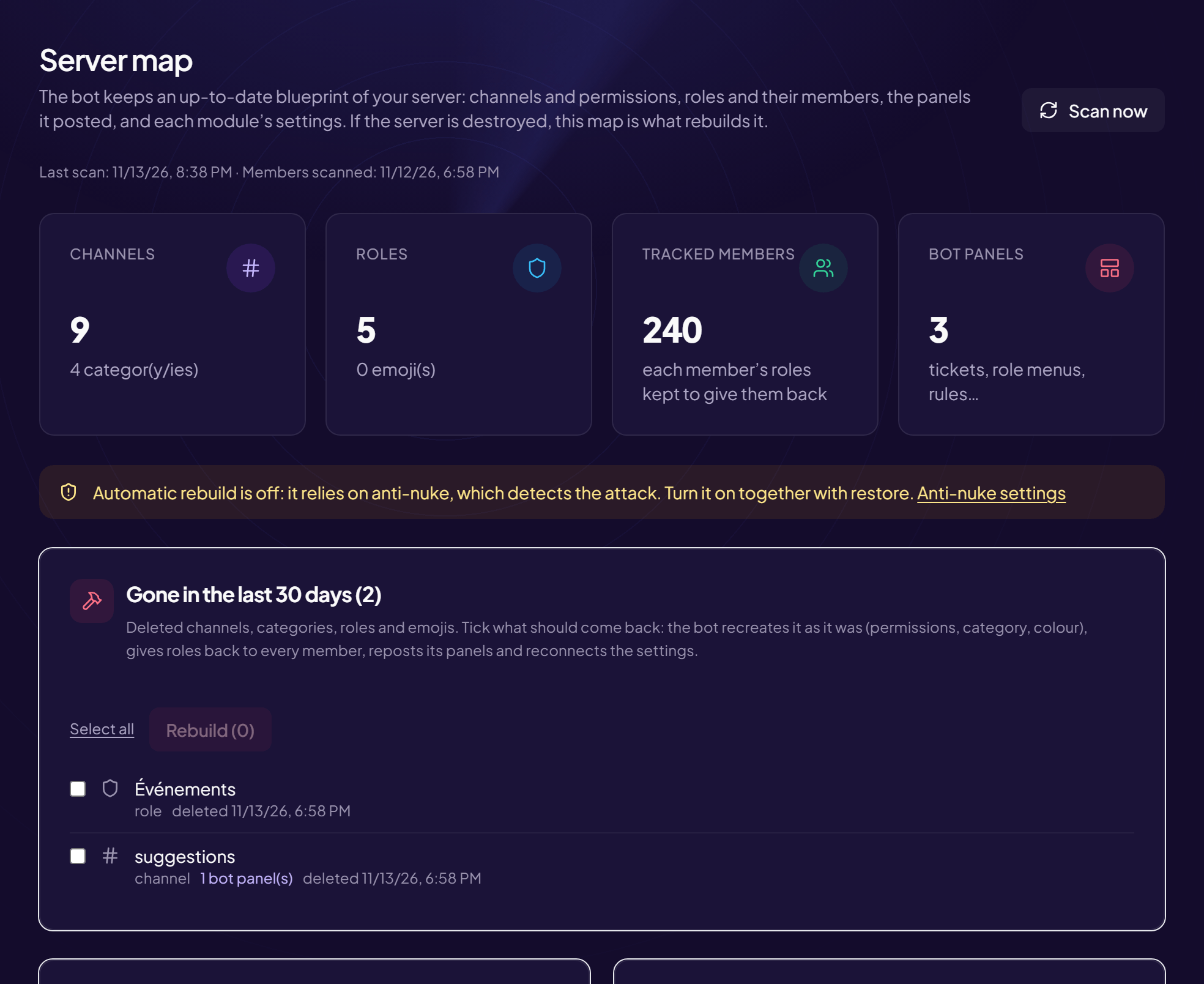
The bot keeps the full blueprint of your server up to date: channels and permissions, roles and their members, the panels it posted and each module’s settings. If the server is destroyed, this map is what lets everything be rebuilt.
Where to find it
Protection › Server map menu.
What the page shows
| Area | Content |
|---|---|
| Header | The dates of the Last scan and of the Members scanned, and the Scan now button. |
| Four counters | Channels (and categories), Roles (and emojis), Tracked members (their roles are kept so they can be given back), Bot panels (tickets, role menus, rules…). |
| Gone in the last 30 days | What has been deleted and can be rebuilt. See the article. |
| Map, roles, panels | The content of the map. See the article. |
| Rebuilds | The history of what has been rebuilt. |
Update the map right now
- Open the page
- Click “Scan now” The bot re-reads your server and updates the map. Do it after a big change (new channels, reorganized roles).
The map keeps itself up to date
The button is there to force an immediate scan. The dates shown tell you whether it is fresh.
Still stuck?
Contact support with the title of this article, the step where you are stuck and what you see on screen.
Contact support More articles: ProtectionLast checked: 13 November 2026.