 OriusBotHelp center
How do I automatically delete adult images (NSFW scan)?
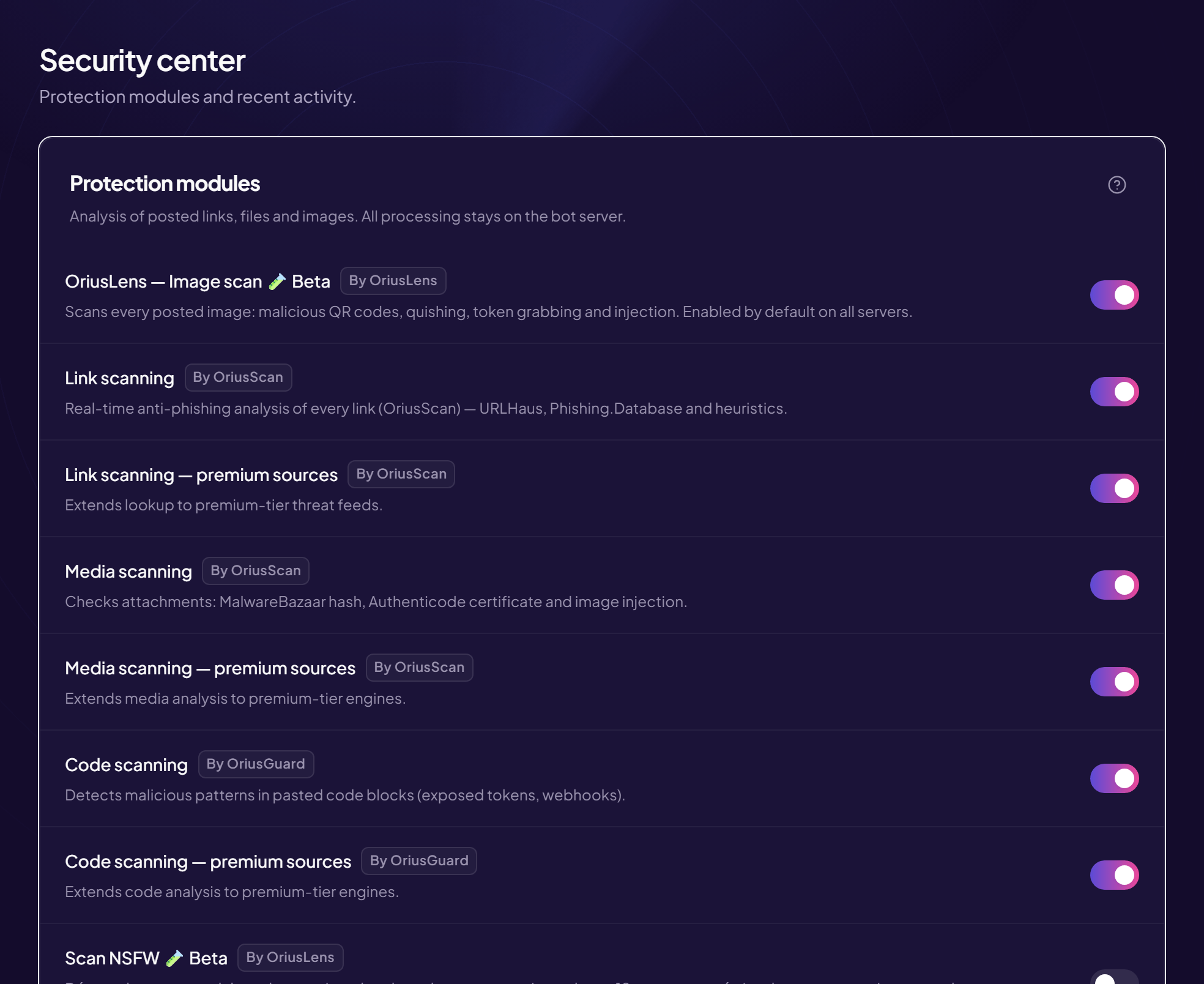
The NSFW scan detects adult content and deletes it in normal channels. Channels marked 18+ are exempt: nothing is deleted there. It is a beta feature: it can make mistakes.
Turn it on
- Open the Security page Left menu, Protection section, then Security.
- Find the “NSFW scan” line with the Beta mention
- Turn the switch on Saved immediately.
What is deleted, and where
| Channel type | Behaviour |
|---|---|
| Normal channel | The adult image is deleted. |
| Channel marked 18+ (age-restricted) | Nothing is deleted. Analysis is done there for learning purposes only. |
How to mark a channel 18+ in Discord
- Open Discord and right-click the channel.
- Click “Edit Channel”
- In “Overview”, turn on “Age-Restricted Channel”
- Save
Beta, so imperfect
A normal image may be mistaken for adult content, and the other way round. If that happens, report it to support with the time and the channel: it is what improves detection.
Still stuck?
Contact support with the title of this article, the step where you are stuck and what you see on screen.
Contact support More articles: ProtectionLast checked: 13 November 2026.