 OriusBotHelp center
Why isn’t the welcome image showing?
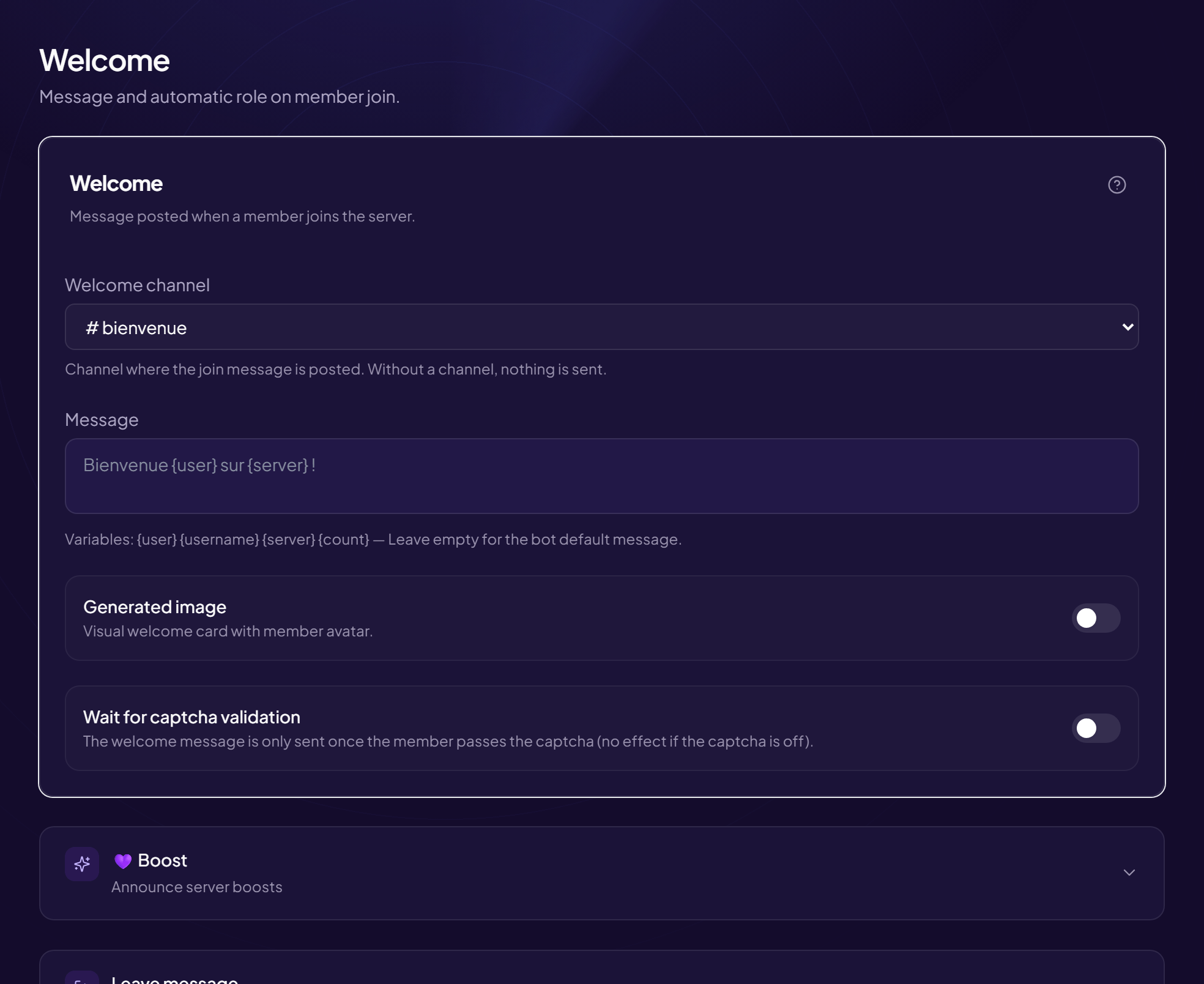
The welcome message is sent, but without the card showing the member’s photo. Check in this order.
- Is the option on? Members › Welcome & Boost menu: the “Generated image” switch must be on, then click Save.
- Can the bot send files? The image is attached to the message: in Discord, the OriusBot role (or the welcome channel) must allow Attach Files, in addition to View Channel and Send Messages.
- Is the background image valid? The “Background image (URL)” field only accepts an https address that leads directly to the image. A web page, a private link or an expired link does not work. Clear the field to go back to the default background, then save: if the image appears, the link was the problem.
- Is a welcome channel selected? Without a “Welcome channel”, nothing is sent, neither text nor image.
- Is the captcha holding the message back? If “Wait for captcha validation” is on, nothing arrives until the member passes the captcha. See the dedicated article.
Try without making anyone leave
The
/config welcome test command sends a test welcome message in the channel. See How to test the welcome message.Still stuck?
Contact support with the title of this article, the step where you are stuck and what you see on screen.
Contact support More articles: Welcoming membersLast checked: 13 November 2026.